 SKU Manager Docs
Resync products
Read your products from Shopify again when something in SKU Manager looks different from your store.
Changes you make in Shopify reach SKU Manager on their own, usually within a minute. Resync products checks your products against Shopify and fixes anything in SKU Manager that doesn't match. It doesn't change anything in your store.
When to resync
- After changing which collections products are in. Shopify doesn't send collection changes as they happen, so they're only picked up when products are checked. Resync if your rules or formats check collections.
- When something in SKU Manager looks different from Shopify, like a product, a variant or a SKU.
- When SKU health says so, with "Some counts are missing because your products haven't been fully read. Resync products to fill them in."
You don't need to resync before running a rule, or out of habit.
Resync
- Select Resync products at the top of the Rules page.
- Then in the confirmation modal, select Resync products again to start.
While it runs, the window says "Reading your products from Shopify". On a large store this can take a few minutes. You can close the window and keep working, and a message shows the result when it's done, with See results to open it again.
The result
- "Your products already matched Shopify" means nothing was out of date.
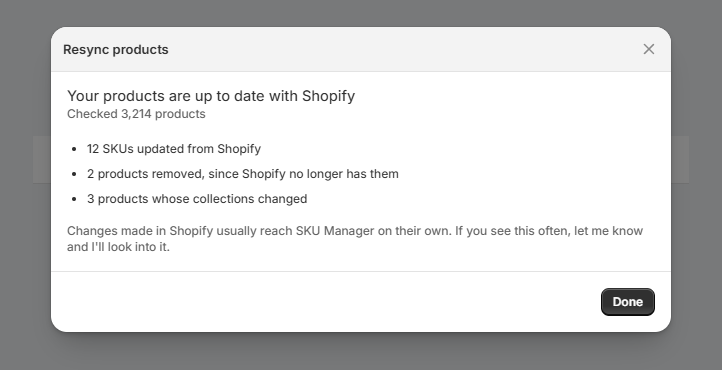
- "Your products are up to date with Shopify" means something was, and lists what changed, like products or variants added or removed, SKUs or barcodes updated from Shopify, or products whose collections changed.
Either way, it says how many products it checked.
If the resync can't finish, it says "Couldn't finish reading your products from Shopify", with Try again. If it keeps failing, let me know through Report an issue under Resources or reach out to me through the support widget in the lower right and I'll look into it.