 SKU Manager Docs
Duplicates
Find SKUs held by more than one variant, see which variant keeps each, and rewrite the rest.
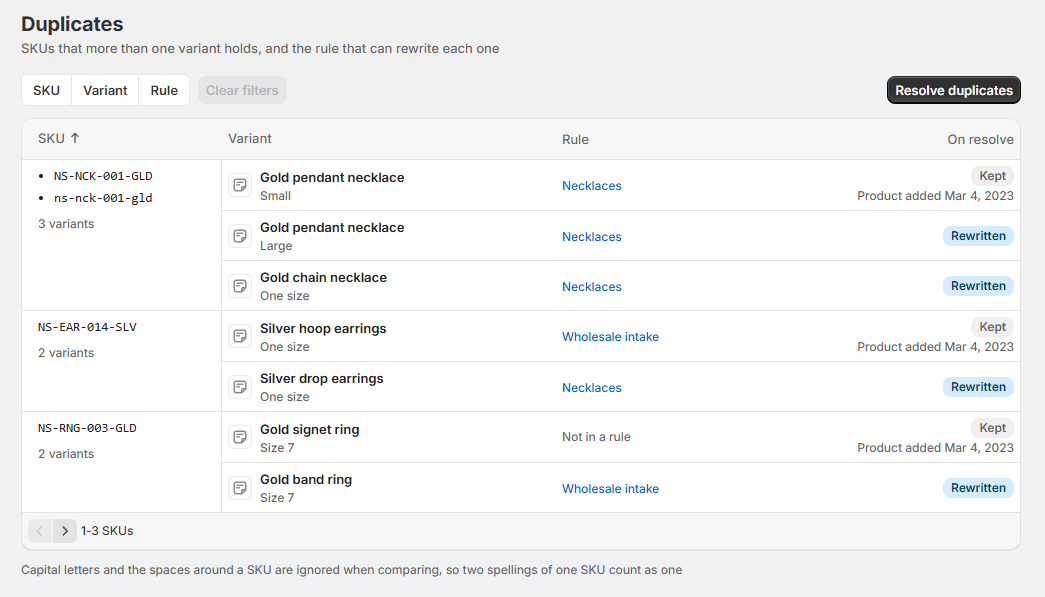
A duplicate is a SKU held by more than one variant. The Duplicates page lists each one, and the rule that can rewrite it.
Capital letters and the spaces around a SKU are ignored when comparing, so TEE-001 and tee-001 count as one SKU.
The Duplicates page
Duplicates are grouped by SKU. Each group lists the variants holding it, the rule each belongs to, and what resolving would do to each:
- Kept: the variant that keeps the SKU, with the date its product was added.
- Rewritten: a variant that would get a new SKU from its rule's format.
- Unchanged: a variant left as it is, because it isn't in a rule, or its rule isn't one you've filtered to.
Filter the list by Rule, SKU or Variant.
Which variant keeps the SKU
Of the variants sharing a SKU, the one whose product was added first keeps it. Shopify doesn't record when a SKU was set, so the date the product was added is the closest thing to who had it first.
A variant has to be in a rule to be rewritten. If the others sharing a SKU aren't in a rule, there's nothing to rewrite, and the page says so with Create rule to cover them.
Resolve duplicates
Select Resolve duplicates. Before anything is written, a confirmation says what the run does:
- Keeps one variant of each SKU, the one whose product was added first.
- Rewrites the rest, with how many variants each rule will rewrite and the format it writes with.
- Leaves variants in no rule.
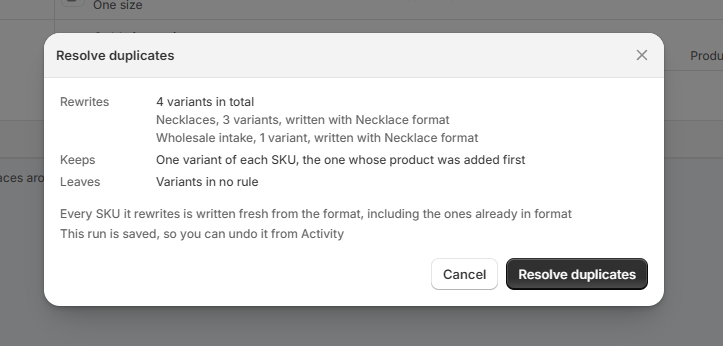
Every SKU it rewrites is written fresh from its rule's format, including ones that already matched it. If you've filtered the list, only the duplicates matching your filters are resolved.
The run shows on the Activity page as "Resolve duplicates in" the rules it wrote through, and can be undone like any other run. Its page has Back to Duplicates to return.
You can also start from SKU health: Resolve duplicates beside a rule opens this page narrowed to that rule. See SKU health.
Where duplicates come from
A run never writes the same SKU twice, and rules sharing a format never hand out the same number. Duplicates still come in from outside a run, like:
- SKUs typed in by hand, or brought in by an import or another app
- a counter set back with Reset counter
- two formats that write the same pattern, each counting from the start
- a duplicated format, which counts from the beginning while the original carries on
Recommendations
- Check the "Kept" variant before resolving. It's the one whose product was added first, which isn't always the one your warehouse, marketplace or labels already know.
- Resolve one rule at a time. Filter by Rule, resolve, and check the run before moving on.
- Put every variant in a rule first. A duplicate held by a variant in no rule can't be rewritten.
- Stop new duplicates at the source. Rules that write the same pattern should share one format, so they share its numbering.