 SKU Manager Docs
Rule and run states
What each rule status, run outcome and skipped-variant reason means, and what to do about it.
Rule statuses
A rule's status shows on the Rules page and in its panel.
| Status | What it means | What to do |
|---|---|---|
| Hasn't run yet | A Manual rule that has never been run. | Run it when you're ready. |
| Manual | Writes only when you run it. | Nothing. Set it to Automatic if new products should get SKUs from it. |
| Automatic | Fills in SKUs for new products that match it. | Nothing. |
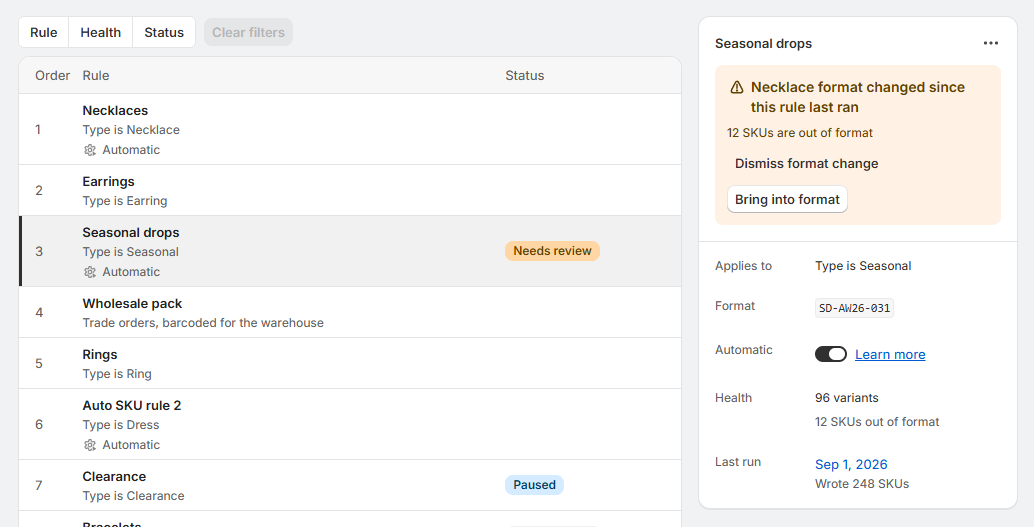
| Needs review | Its format has changed since the rule last ran, so SKUs it wrote may no longer match. | See Needs review. |
| Paused | Set to Automatic, but not writing new products. | See Paused. |
A rule set to Automatic shows Automatic even before its first run, since it's already doing its job.
Needs review
The rule's panel says what changed, like "Necklace SKUs changed since this rule last ran", and how many of its SKUs are now out of format, or that "Existing SKUs still match it".
- Bring into format opens the rule ready to rewrite its SKUs that no longer match.
- Dismiss format change leaves its SKUs as they are and clears the status.
Running the rule again clears it too.
Paused
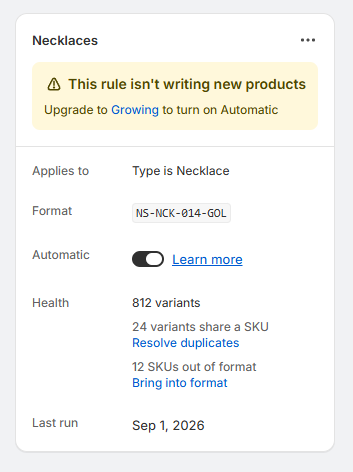
The rule's panel says "This rule isn't writing new products", and why:
- Your store has outgrown its plan. The notice names the plan that fits, like "Upgrade to Growing to turn on Automatic".
- It was disabled before 3.0. Select Resume rule to start it writing again.
Notices in a rule's panel
| Notice | What it means | What to do |
|---|---|---|
| "Writing SKUs" | The rule is running. | Wait for it to finish. It keeps going if you close the app. |
| "The last run didn't finish" | The rule's last run stopped before the end. | Select Run rule to try again. |
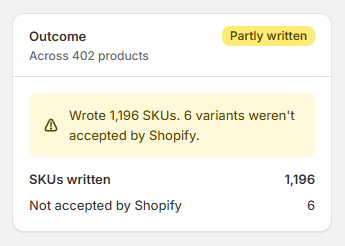
| "The last run was partly written" | Shopify accepted some of the run's SKUs and not others, like "Wrote 110 SKUs. 10 variants weren't accepted by Shopify." | Run the rule again to retry the ones it didn't write. |
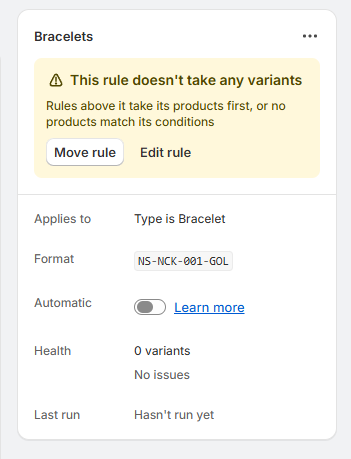
| "This rule doesn't take any variants" | Rules above it take its products first, or no products match its conditions. | Select Move rule to move it higher, or Edit rule to change its conditions. See How order decides. |
| "Covers fewer products after the update" | Before 3.0, the rule matched products in more than one way, like a collection or a vendor. A rule now needs all its conditions to match. | Select Split rule to cover the same products with two rules. |
In a rule's Health, "Not checked yet" means SKU health hasn't counted the rule's variants yet, which happens soon after a rule is created or changed.
Run outcomes
A run's outcome shows on the Activity page and on the run's page.
| Outcome | What it means |
|---|---|
| Running | The run is writing SKUs. A large run is written by Shopify, which can take a few minutes, and keeps going whether or not the app is open. |
| "Wrote 120 SKUs" | The run finished and wrote that many SKUs. |
| Nothing to write | The run finished with nothing to write, like when every variant it covered already had a SKU or already matched the format. |
| Partly written | Shopify accepted some of the run's SKUs and not others. The run's page counts the ones it didn't accept. |
| Didn't finish | The run stopped before the end. Its page says either "Nothing was left half written" or "Some SKUs may have been written before it stopped". Run the rule again to finish. |
A run of several rules, like an automatic run, lists each rule on its page. A rule the run couldn't write through, while the others went ahead, shows Didn't run.
Why a variant was skipped
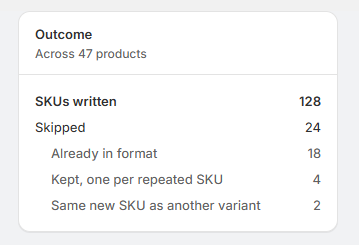
A run's page counts the variants it left alone under Skipped, by reason:
| Reason | What it means |
|---|---|
| Already has a SKU | The run only filled in missing SKUs, and this variant had one. |
| Already in format | Its SKU already matched the format, so the run left it alone. |
| Kept, one per repeated SKU | It shares a SKU with other variants, and it's the one that keeps it. |
| Would come out blank | The format writes nothing for this variant. |
| Same new SKU as another variant | It would have got the same new SKU as another variant in the run. |
| Changed since the run | In an undo or a redo, its SKU had changed since, or its barcodes had filled up to 20, so it was left as it is. |
Not accepted by Shopify is listed separately, since it isn't a choice the run made. It's a SKU Shopify refused to save.
"Barcodes left alone, already holding 20" is listed separately too, on a run that wrote its SKUs to the barcode. Those variants weren't skipped: each got its SKU, and its barcodes stayed as they were because it already had 20, the most Shopify allows.
Undo states
| State | What it means |
|---|---|
| "Until Oct 3" | The run can be undone until that date. |
| Won't expire | You've chosen to keep the run's undo past its usual date. |
| Expired | The run can no longer be undone or redone. It stays on the Activity page. |
| "Undone 2 hours ago" | The run has been undone. It can be redone until its undo would have expired. |