 SKU Manager Docs
Before you edit SKUs
Review important precautions before making SKU changes, especially when using patterns that could create duplicate SKUs.
Before you create or update SKUs in SKU Manager, it is important to understand how SKU changes can affect the rest of your store. A small change pattern can sometimes create duplicate SKUs, so it is worth reviewing your setup carefully and checking for conflicts afterward when needed.
The main risk to watch for
When you generate new SKUs or update existing ones, SKU Manager does not stop a pattern from creating a SKU that already exists elsewhere in your store. This means a bulk change can accidentally create duplicate SKUs if your naming or numbering pattern overlaps with values already in use.
Warning
This is most likely to happen when you:
- reuse a numbering pattern that may already exist in your catalog
- apply the same SKU format across multiple products or variants
- update a large group of items at once without first confirming the final SKU format
What you should do before or after making changes
If there is any chance your new SKU pattern could match SKUs already in your store, plan to run a duplicate check after you finish the update. This gives you a quick way to spot conflicts and correct them before they cause confusion in your catalog or operations.
Review your SKU pattern
Before you make changes, look over the format you plan to use and consider whether it could produce values that already exist in your store.
Apply your SKU changes
Create or update SKUs in SKU Manager using your chosen pattern.
Run a duplicate check
After the update, run a duplicate check if you think the new values may conflict with existing SKUs.
Resolve any duplicates found
If duplicate SKUs are detected, update the affected items so each SKU is unique where needed for your workflow.
Note
Practical tip for fixing duplicates
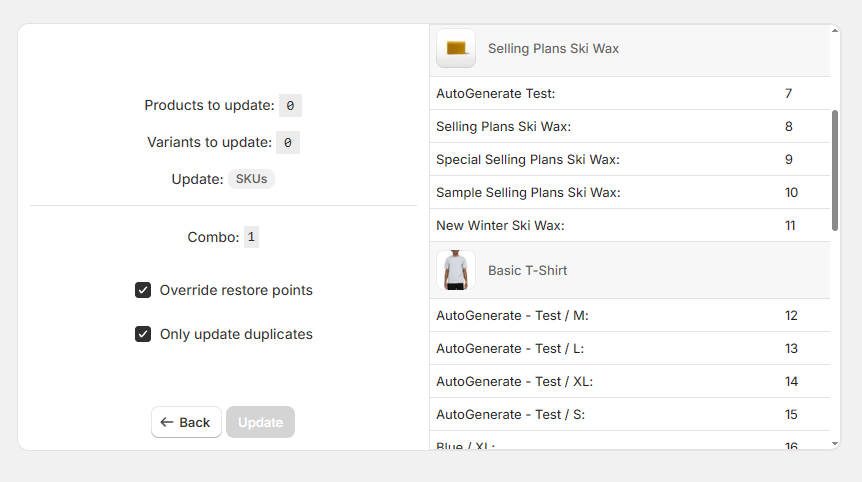
When you are working through duplicate SKUs, you do not always need to update every SKU in a product. In the confirmation step, you can limit the update to only the duplicate entries.
Tip
Keep SKU changes safe and manageable
SKU Manager makes bulk SKU updates faster, but it is still important to check the results when your pattern could create overlap. A quick duplicate check after making changes can help you catch issues early and keep your store data clean.